
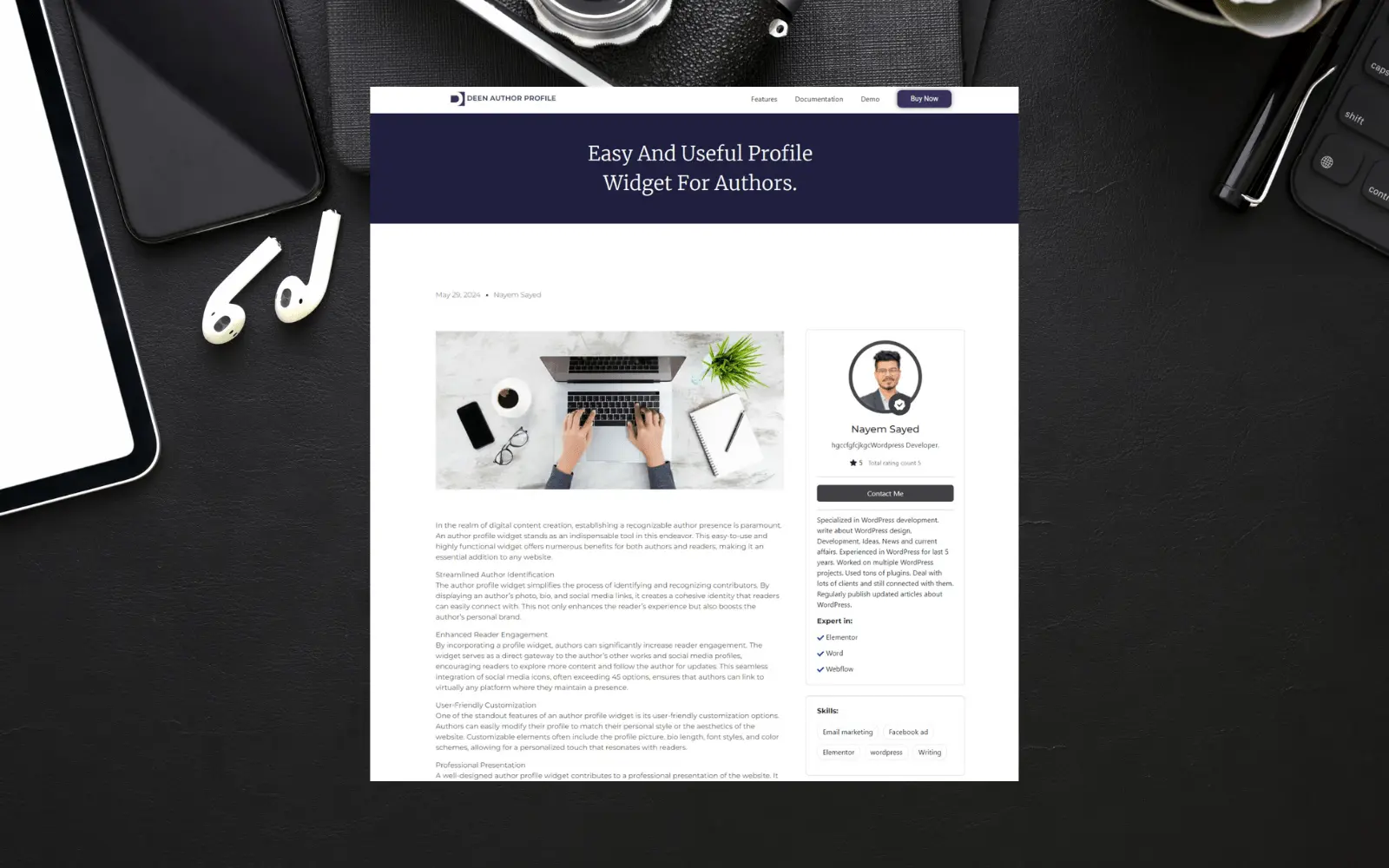
In today’s digital landscape, creating a personal connection between your audience and the authors behind your content is essential. A well-crafted author profile not only builds trust but also enhances user engagement and credibility. The Deen Author Profile widget for Elementor is designed to help you achieve just that. This versatile and responsive widget is perfect for websites with multiple authors or contributors, offering a range of features that highlight each author’s profile in a compelling and professional manner.
Key Features of Deen Author Profile
The Deen Author Profile widget provides a comprehensive solution for displaying detailed and attractive author profiles on your website. Here’s a closer look at its key features:
- Avatar
Personalized Image: Display a personalized picture or image representing the author, making their profile easily recognizable.
Video Popup: Enhance the avatar section with a video introduction, allowing visitors to quickly learn about the author through an engaging video. - Badge
Achievements and Recognitions: Highlight special achievements or recognitions with a badge, adding an element of prestige to the profile. - Name
Clear Presentation: Ensure the author’s name is prominently displayed, making it easy for visitors to identify the author. - Review
Credibility and Trust: Show the author’s reviews and ratings to build credibility and trust with your audience. - Action Button
Direct Interaction: Include buttons such as “Contact Me” or “Get a Quote” to facilitate direct interaction between visitors and the author. - Expertise
Professional Strengths: List the areas the author specializes in, so visitors can understand their professional strengths and areas of knowledge. - Clients
Experience Showcase: Highlight the clients the author has recently worked with, showcasing the author’s experience and reliability. - Skills
Key Abilities: Display a list of the author’s key abilities and strengths, allowing visitors to quickly see what the author is good at. - Social Presence
Social Media Integration: Highlight social media profiles so visitors can connect and follow the author on various platforms. - Education
Academic Background: Share information about the author’s educational background to highlight their qualifications and academic achievements.
Pro Version Features
The Pro version of the Deen Author Profile widget unlocks advanced features that provide a dynamic and engaging author profile experience. With the Pro version, you gain access to:
Video Popup: Add engaging video introductions.
Badge: Highlight achievements and recognitions.
Review: Display detailed reviews and ratings.
Action Button: Include interactive buttons for direct communication.
Expertise: List professional strengths in detail.
Clients: Showcase recent clients and projects.
Skills: Display key abilities and strengths.
Social Presence: Integrate social media profiles seamlessly.
Education: Highlight educational qualifications.
Dynamic Tags Integration
One of the standout features of the Pro version is the integration of dynamic tags in Elementor. After installing the Pro version, you can update the author profile with the new features in the edit profile option. These dynamic tags will automatically update and display the latest information across your website wherever the author profile is used, ensuring consistency and accuracy.
How to Use Deen Author Profile Widget
Step 1: Installation and Activation
Install the Deen Author Profile plugin from the WordPress repository or upload the plugin file.
Activate the plugin and ensure it integrates seamlessly with Elementor.
Step 2: Adding the Widget
Open the Elementor editor on the page or post where you want to add the author profile.
Drag and drop the Deen Author Profile widget from the Elementor panel to the desired location.
Step 3: Configuring the Profile
Customize the layout, style, and content settings in the widget options.
Add or edit author information, including bio, profile picture, video popup, badge, reviews, expertise, clients, skills, social media links, and education.
Step 4: Styling and Finalizing
Adjust design settings to match your website’s branding, including colors, fonts, and animations.
Preview the profile in real-time and make any necessary adjustments before publishing.
Conclusion
The Deen Author Profile widget for Elementor is an indispensable tool for creating detailed, engaging, and professional author profiles on your website. Its rich feature set, including personalized avatars, video popups, badges, reviews, and social media integration, ensures that your authors are presented in the best possible light. The Pro version further enhances this experience with advanced features and dynamic tags, making it easy to maintain up-to-date profiles across your site. Embrace the Deen Author Profile widget and transform the way you showcase your authors, building trust and engagement with your audience.
